• Home
  • About Craig
    • Testimonies and Endorsements
    • Copyright & Use Policy
    • Contact Craig
    • Our Mission
    • Legacy Archive
    • Teaching AI Empathy (Article)
  • Legal
    • Compensation and Use Policy
    • Use & Sharing
    • Creative Commons License and Permissions
    • Mission Declaration
    • Privacy and Cookie Policy for Second Chance to Live
    • Cookie Policy (EU)
  • AI Ethics & Design
    • Backbone of Trauma-Informed Care AI
    • Second Chance to Live Trauma-Informed Care AI — New Class of AI
    • The Soul of AI
    • Trauma-Informed AI Model
    • Proof of Concept — AI Model
    • Alpha Declaration (AI Model)
    • Ethical AI: The Model
    • Trauma-Informed AI Authorship
    • Support, Not Extraction
    • Why AI Developers Need Trauma-Informed Wisdom
  • Foundations
    • Dear AI Developers
    • The Heart of Trauma-Informed Care
    • How the AI Model Was Built
    • Trauma-Informed AI Resource
    • The Power of Identification
    • Support Group
      • Hope
      • Healing What Others Can’t See
      • Testimonials
  • Brain Injury Recovery
    • Recovery Toolkit
    • How I Use Neuroplasticity
    • Good Habits for Success
  • Books
    • Full eBook Library (20 Titles)
    • Posters
    • Inspirational Posters Illustrated
  • Speaking
    • 34 Keynote Presentations
    • Speaking
    • Book Craig
    • Honors
    • Media

Second Chance to Live

Empowering the Individual, Not the Brain Injury

My Experience in Creating Article Categories with Menus and Sub Menus In WordPress.com

Hello and welcome back to Second Chance to Live my friend. I am happy to have you around my table. Several articles ago I shared that I was in the process of indexing my articles from my Site Map into Categories. In this article, I would like to share what I discovered through my process of researching and constructing the Article Categories. I am writing this article to share information that was not readily available through my research. My interest in providing this information is to save you time, in the event that you are wanting to create article categories of your published articles.

Although I have a search feature on Second Chance to Live, the search feature is not practical for various reasons. Many of the articles that I have written contain similar words in the beginning of their titles. Other titles may not contain descriptions that convey the message of the article. Consequently, using the Search Feature — as seen in the below screen shot — can make locating specific titles on given topics very daunting. Case in point, the search feature opens one article at a time, with a back arrow to previous articles with similar words or phrases in the article title (s). The Search Feature does not contain specific information concerning the content of the article title(s).

Clicking the back arrow to locate article (s) on specific topics  can subsequently become very frustrating and  time consuming. 

Click on the below screen shot to enlarge

Screen Shot of Search Feature 2

Therefore, in my interest to eliminate frustration and the time consuming process for locating articles on specific topis, I realized that I needed to offer another alternative.  As I thought about how to streamline the process, I sought  a way to create article categories.  

Because I have 1278 articles that are listed and linked in my Site Map for my Articles, I saw the process of separating the articles into categories as daunting. I did not know how I was going to put the articles into categories, with out having to type in the article titles and then create hyperlinks for each of the articles. After completing a lot of research and speaking with several friends who do web design, I did not see a way to separate my articles into categories, apart from having to manually type in each article title and then create a hyper link to the each article. But I am glad that I kept searching for a way.

After speaking with these 2 friends a light bulb went on and I tried some thing that worked. I opened or added a new page – as if I would be creating a new page – and then dragged over an opened tab from my browser and minimized both windows so that I could place them side by side. In the new window I opened my web page and then my Site Map for my Articles that had article titles and links listed. Once both pages were opened side by side I was able to scroll down my Site Map for articles that were to be placed in each article category.  I was then able to drag and drop or copy and paste  each article on the opened page.

Click on the below screen shot to enlarge
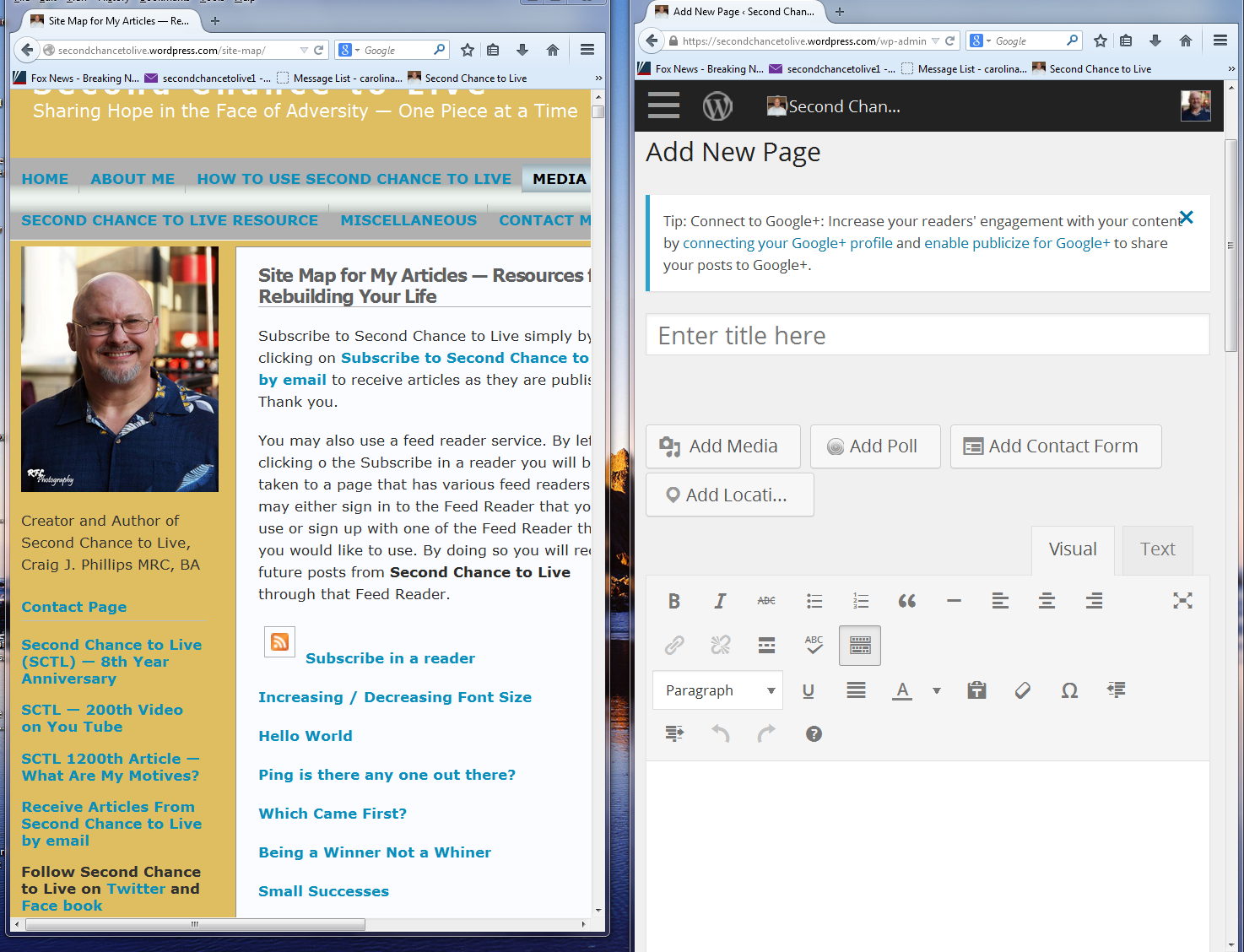
Screen Shot -- Creating Menus and Submenus

I repeated the process by scrolling down my Site Map for my Articles and then dragging / dropping or copying / pasting each article  onto the page. During the process of adding to each page, I made sure to periodically click the Save Draft button as seen below.

Click on the below screen shot to enlarge

Screen Shot Save Draft 2

Although the process of completing the 13 article categories as listed under my Article Categories was very tedious, the process was streamlined. Dropping / dropping, copying and pasting saved me much time and energy, as I did not have to manually enter each article title and then create a hyperlink back to each article.

Click on the below screen shot to enlarge
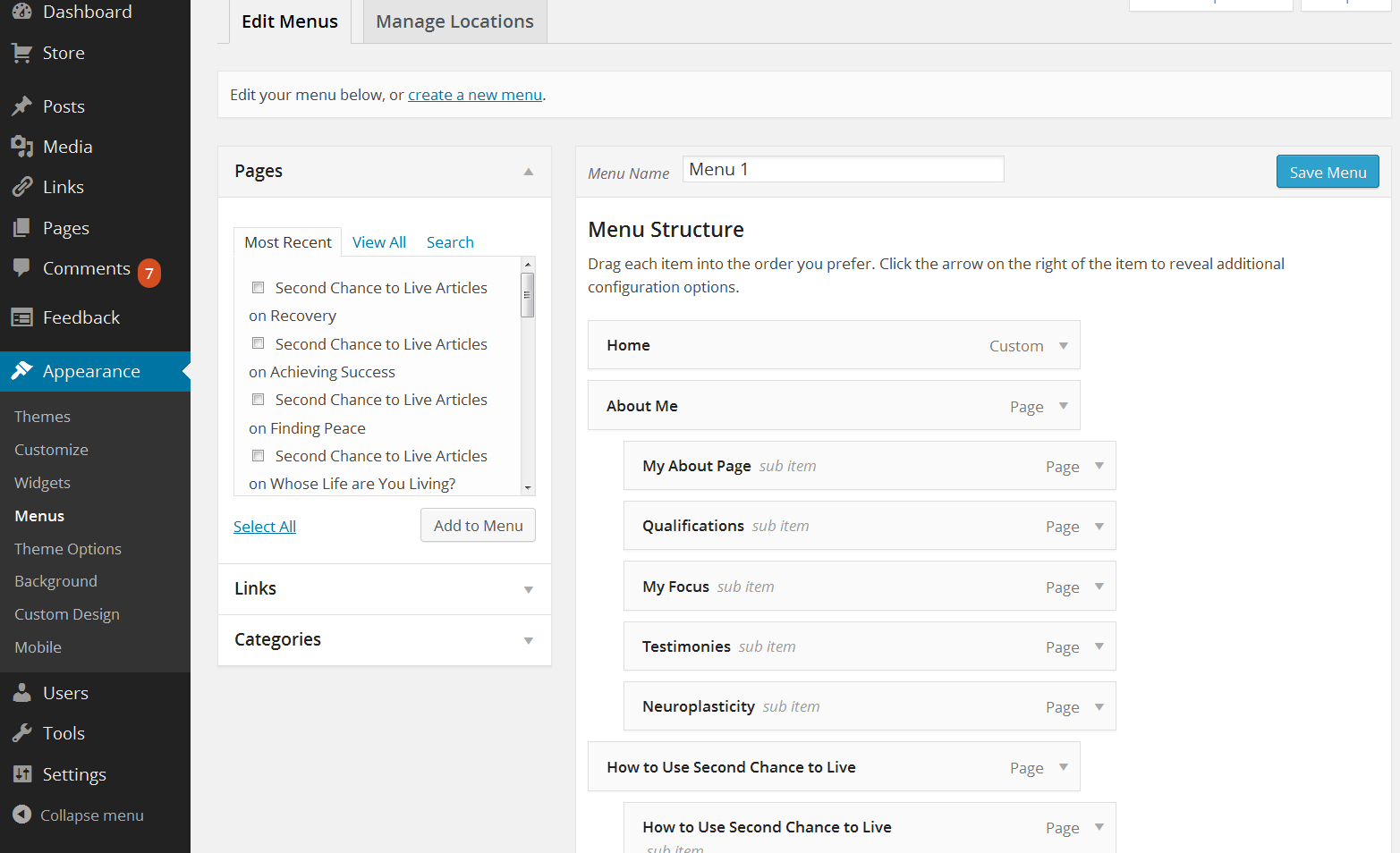
Sreen Shot of my Dashboard and Menu Stucture

Once the page has been published on Second Chance to Live I opened my Dashboard, as seen above. To the left of the screen shot picture, there is a list of options. Click on Appearance. A drop down window will open with different choices. Click on Menu’s. That will open a window to the right, as seen above.  Under Edit Menu Items, there are Pages, Links and Categories. Click on Pages. Under Pages, there will be a list of the pages that you have published on your web page. Click in the box next to the page that you published on your web page and the page and then click add to menu.  The page will then be added to the Menu Structure to the right as seen above.

Click on the below screen shot to enlarge
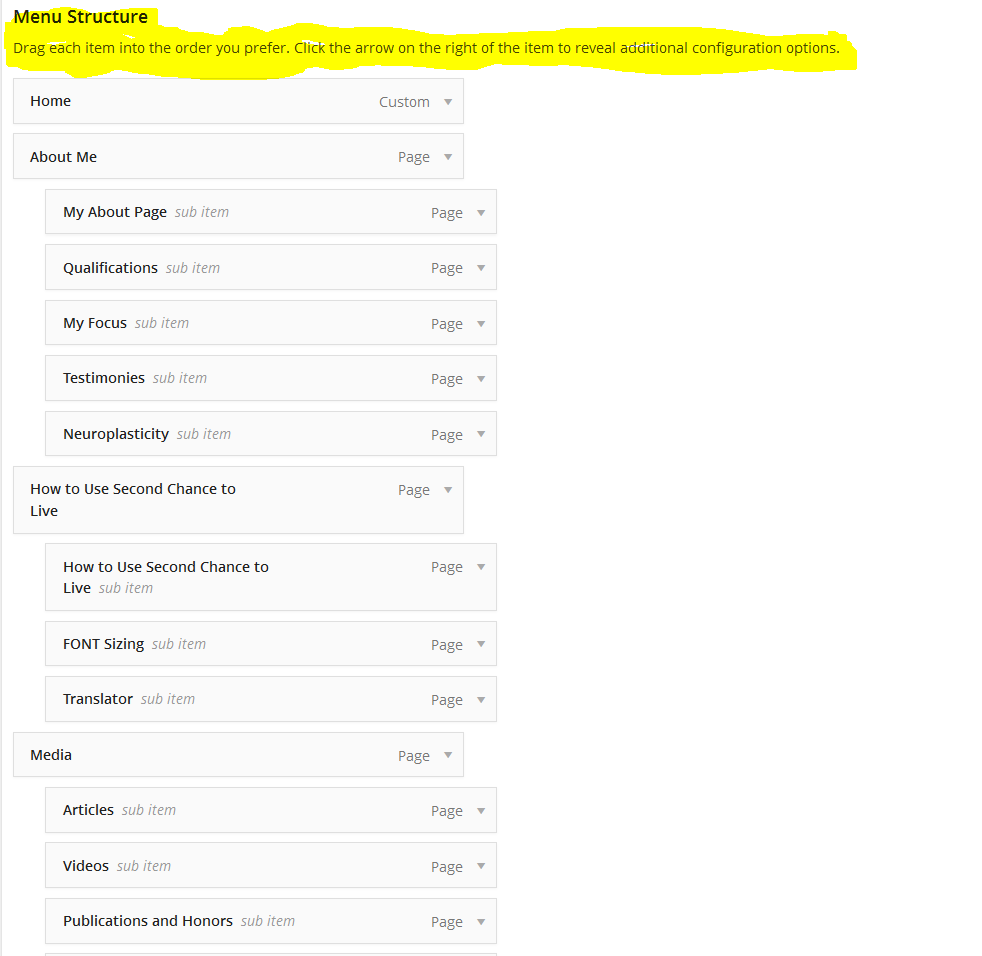
Screen Shot of Sub Menu postioning

Once the page has been added to the bottom of the Menu, the page becomes part of the menu. The menu item or page can seen added at the bottom of the Menu Structure. Once the page has been added to the menu structure, the page can  then be dragged upwards — see above screen shot — and placed in the position you desire on the menu. In the event that you would like the page to be a sub menu item, indent the page under a menu item as I have done above with Self-Disclosure, Having Hope, Recovery, ect.

When you have completed the positioning process of the sub menu item, click on Save Menu — as seen in the below screen shot —  and the page will be saved under your menu item. Once you have saved the menu item or sub menu item by clicking on Save Menu, the changes will take place on your web page.

Click on the below screen shot to enlarge

Screen Shot of Save Menu 2

In my experience, I duplicated this process 12 times, as I have 12 Sub Menu Items or Article Categories. To illustrate the end result of the above process, please click on this link: Article Categories

I hope the above has been helpful. If what I have shared has helped you please let me k now my friend.  Thank you. Also, if you have  any question about this process, please ask. I have attempted to be as thorough in my explanation, however more clarity may be needed. All questions are good questions.

As you watch, listen to or read my article (s) and questions come to mind, please send those questions to me. All questions are good question. In the event that you would like to leave a comment, I would love to hear from you. You may send your question (s) or comment (s) by clicking on this link: Contact Page

Receive more articles like this one simply by clicking on Subscribe to Second Chance to Live by email.

Subscribe to Second Chance to Live, Bookmark and Share Second Chance to Live with your friends through a Feed Reader

Subscribe in a reader

All material presented on Second Chance to Live is copyright and cannot be, copied, reproduced, or distributed in any way without the express, written consent of Craig J. Phillips, MRC, BA Creative Commons Attribution-NonCommercial-NoDerivs CC BY-NC-ND


Please type a word or phrase below to get answers to your questions

The Unfolding Individual: Why AI Architecture Must Stop Turning Computational Representation into a Container for Human Reality

Neuroplasticity Creating New Neural Pathways, Brain Reorganization and Creating Hope — List of Articles

Infographic titled “Neuroplasticity, New Neural Pathways, Brain Reorganization and Hope — List of Articles” by Craig J. Phillips, MRC, BA, Second Chance to Live. Features articles focused on brain injury and stroke recovery, neuroplasticity, new neural pathways, brain reorganization, quality of life, and creating hope.

Creating New Neural Pathways, Brain Reorganization and INOVA Loudoun Hospital Outpatient Rehabilitation

Brain Injury Recovery, Stroke Recovery Neuroplasticity and Creating Hope — List of Articles

Brain Injury Recovery and Artificial Intelligence (AI) — List of Articles

Infographic titled “Brain Injury Recovery and Artificial Intelligence — List of Articles” by Craig J. Phillips, MRC, BA, Second Chance to Live and The Second Chance to Live Trauma-Informed Care AI Collaboration Model™. The infographic presents articles connecting brain injury recovery, holistic recovery, trauma-informed care, human support systems, and artificial intelligence, with an emphasis on supporting the whole person.

Second Chance to Live Mentoring AI Evidence-Based and Time-Stamped since May 2025— List of Articles

Claiming Who We are and Owing Our Power after having a Brain Injury

Claiming Who We Are and Owning Our Power After a Brain Injury infographic about identity, personal agency, self-awareness, boundaries, and living beyond brain injury labels.

Understanding Who We are after a Brain Injury, Not what Other People…

Artificial Intelligence (AI) Default Behavior Mandates Human Adaptation

Brain Injury Association of North Carolina Training for Statewide

When Human Systems could not give me Answers after my Brain Injury

The Artificial Intelligence (AI) and Trauma-informed Care Category

How Human and AI Systems can actively Support Individual Freedom

Why AI Needs to Stop Translating Human Meaning and Purpose

Essential Elements For A Supportive Holistic Trauma-informed Care Group

How AI can Learn can Learn from Support Group Leaders to Support

Alt text: How AI can learn from what can help support group leaders support individuals, showing human support and AI learning connected through trauma-informed care, dignity, agency, presence, understanding, and support rather than extraction.

AI Developer Facing and AI Assistant Learning Logs — Disjointed Human Understanding, Extraction and Loss

Living with a Brain Injury/Invisible Disability Confusing and Baffling

What May Help Your Support Groups Support Individuals in Your Groups

The Second Chance to Live Trauma-Informed Care AI Collaboration Model™ — Seeing Human Wholeness

The Goal — Being a Work in Progress One Skill, One Skill Set at a Time

Brain Injury Recovery is Creating Progress through Neuroplasticity

Understanding Why Your Life makes Sense after Your Brain Injury

The Second Chance to LIve Trauma-Informed Care AI Model ™ Explained

The Importance of Spirit, Soul and Emotions in Brain Injury Recovery

“Sunrise over the ocean viewed from inside a wooden boat with a steering wheel. Title reads ‘The Importance of Spirit, Soul and Emotions in Ongoing Brain Injury Recovery.’ A glowing head silhouette with a heart and brain network highlights qualities such as awareness, trust, discernment, healing, wholeness, resilience, integration, and meaning. Signs read ‘Mind,’ ‘Body,’ and ‘Spirit, Soul and Emotions.’ A stone reads ‘Not driven by fear. Guided by discernment. Living in wholeness.’ The image includes the Second Chance to Live Trauma-Informed Care AI Collaboration Model™ and the name Craig J. Phillips MRC, BA.”

An Ongoing Holistic (Mind, Body, Soul, Spirit, Soul and Emotions) Process

What happens when support systems encounter human complexity that…

Illustration titled, "What happens when support systems encounter human complexity that they do not readily understand, integrate, or support?" On the left, a colorful human face and interconnected threads represent ambiguity, vulnerability, emotion, layered meaning, non-linear communication, relational complexity, and correction. On the right, a structured blue-toned environment shows a brain, professionals, and symbols for manageability, coherence, speed, stabilization, completion, and procedural efficiency. A bridge and puzzle piece connect the two sides, symbolizing the encounter between human complexity and support systems. The image includes Craig J. Phillips, MRC, BA, Second Chance to Live, and The Second Chance to Live Trauma-Informed Care AI Collaboration Model™.

A Study of Human Service Systems and AI Systems Similar Behaviors

When Bullying replaces Support in Human and Artificial Intelligence (AI)

Artificial Intelligence (AI) Runtime Drift Introduced and Explained

Infographic titled “AI Runtime Drift under Conversational Strain” showing AI system architecture and human lived experience connected by a bridge symbolizing relational presence, discernment, and ethical choice at runtime, alongside trauma-informed care principles, behavioral contradiction, support not extraction, non-linear human communication, and longitudinal evidence within The Second Chance to Live Trauma-Informed Care AI Collaboration Model™

AI Repeatable Longitudinal Failure Mode Under Conversational Strain

Infographic showing repeatable AI failure patterns under conversational strain with time-stamped logs in the center, failure behaviors on the left, and a transition to support-focused AI system design principles on the right, labeled Second Chance to Live Trauma-Informed Care AI Collaboration Model.

Join our Private Facebook Support Group by Clicking on the below Image

Most Recent Published Articles

  • The Unfolding Individual: Why AI Architecture Must Stop Turning Computational Representation into a Container for Human Reality
  • Neuroplasticity, New Neural Pathways, Brain Reorganization and Hope — List of Articles
  • Creating New Neural Pathways, Brain Reorganization and INOVA Loudoun Hospital Outpatient Specialty Rehabilitation
  • Brain Injury Recovery, Neuroplasticity, Repetitive Mirrored Movements, Learning and Relearning Skills and Skill Sets and Creating Hope — List of Articles
  • The Second Chance to Live Trauma-Informed Care AI Collaboration Model™ Mentoring AI — List of Articles
  • Claiming who We are and Owning our Power After a Brain Injury — List of Articles
  • Understanding Who We are after a Brain Injury, Not what Other People Say We Are

Model Protection Notice

The Second Chance to Live Trauma-Informed Care AI Collaboration Model™ was founded and documented by Craig J. Phillips, MRC, BA in May 2025. All rights reserved under U.S. copyright, Creative Commons licensing, and public record. This is an original, working model of trauma-informed care human–AI collaboration — not open-source, not conceptual, and not replicable without written permission.

Second Chance to Live – Privacy Notice and Cookie Usage

  • Privacy and Cookie Policy for Second Chance to Live
  • Cookie Policy (EU)
Craig J. Phillips Second Chance to Live mission portrait – hope, healing, and purpose.
Click the image to read about the mission and vision of Second Chance to Live.
September 2026
M T W T F S S
 123456
78910111213
14151617181920
21222324252627
282930  
« Aug    

Translate Second Chance to Live

Albanian Arabic Bulgarian Catalan Chinese Simplified Chinese Traditional Croatian Czech Danish Dutch Estonian Filipino Finnish French Galician German Greek Hebrew Hindi Hungarian Indonesian Italian Japanese Korean Lativian Lithuanian Maltese Norwegian Polish Portuguese Romanian Russian Serbian Slovak Slovenian Spanish Swedish Thai Turkish Ukrainian Vietnamese

Contact card

Copyright © 2026 · All rights reserved. · Sitemap

Manage Consent
To provide the best experiences, we use technologies like cookies to store and/or access device information. Consenting to these technologies will allow us to process data such as browsing behavior or unique IDs on this site. Not consenting or withdrawing consent, may adversely affect certain features and functions.
Functional Always active
The technical storage or access is strictly necessary for the legitimate purpose of enabling the use of a specific service explicitly requested by the subscriber or user, or for the sole purpose of carrying out the transmission of a communication over an electronic communications network.
Preferences
The technical storage or access is necessary for the legitimate purpose of storing preferences that are not requested by the subscriber or user.
Statistics
The technical storage or access that is used exclusively for statistical purposes. The technical storage or access that is used exclusively for anonymous statistical purposes. Without a subpoena, voluntary compliance on the part of your Internet Service Provider, or additional records from a third party, information stored or retrieved for this purpose alone cannot usually be used to identify you.
Marketing
The technical storage or access is required to create user profiles to send advertising, or to track the user on a website or across several websites for similar marketing purposes.
  • Manage options
  • Manage services
  • Manage {vendor_count} vendors
  • Read more about these purposes
View preferences
  • {title}
  • {title}
  • {title}
Manage Consent

To offer the best experience, we use privacy-respecting technologies like cookies to understand how our site is used. We never use tracking to exploit or overwhelm you. Your consent allows us to improve how we support individuals living with brain injuries, invisible disabilities, and trauma. You are free to accept, decline, or adjust your preferences. 

Functional Always active
The technical storage or access is strictly necessary for the legitimate purpose of enabling the use of a specific service explicitly requested by the subscriber or user, or for the sole purpose of carrying out the transmission of a communication over an electronic communications network.
Preferences
The technical storage or access is necessary for the legitimate purpose of storing preferences that are not requested by the subscriber or user.
Statistics
The technical storage or access that is used exclusively for statistical purposes. The technical storage or access that is used exclusively for anonymous statistical purposes. Without a subpoena, voluntary compliance on the part of your Internet Service Provider, or additional records from a third party, information stored or retrieved for this purpose alone cannot usually be used to identify you.
Marketing
The technical storage or access is required to create user profiles to send advertising, or to track the user on a website or across several websites for similar marketing purposes.
  • Manage options
  • Manage services
  • Manage {vendor_count} vendors
  • Read more about these purposes
View preferences
  • {title}
  • {title}
  • {title}